


Monday morning, and not sure which customers still owe you?
For example: Monday morning, and you are not sure which customers still owe you.
30 days free, no credit card required

Generated image, not a real person.
What it costs
Money you earned, sitting with people you forgot to ask.
What owners do today
Go through the invoice folder and the bank statement side by side.
Pick one time each week, and keep it
Chasing payment works best as a habit, not a mood. Pick one time each week, such as Monday morning before the first call, and put it on the calendar like a job.
Make one list, oldest first
Write down every invoice you sent that is not paid yet. For each one, note:
- The customer and the job.
- The amount.
- The date you sent it, and the date it was due.
- The last time anyone reminded them, and how.
Sort the list into three piles
Each pile gets a different, polite next step, done the same day.
- Not due yet: nothing to do. Check it again next week.
- Just past due: a short, friendly reminder by email, with the invoice attached.
- Long past due: a phone call. Ask when they plan to pay, and write down what they said.
Record every payment the day it comes in
A check that rides in the truck for a week still shows as unpaid, and the next Monday you chase someone who already paid. Mark each invoice paid the day the money arrives, so the list stays true.
Make the next invoice easier to pay
The easiest invoice to pay is one the customer expected. Put your payment terms on the estimate, send the invoice when the work is done, and say in one line how the customer can pay.
More guides: Price a job so it covers parts, labor and overhead; Ask customers for reviews, and remember to; Get written approval for extra work; Switch software without losing your customer list; The first month on new software, week by week; Price good, better and best options; HVAC estimates and invoices; Plumbing estimates and invoices; Electrical estimates and invoices; Roofing estimates and invoices; Solar estimates and invoices; Handyman estimates and invoices. All guides.
AI daily brief
Open the app's home screen in the morning.
The AI daily brief names how many invoices are overdue and their total, from your own invoices.
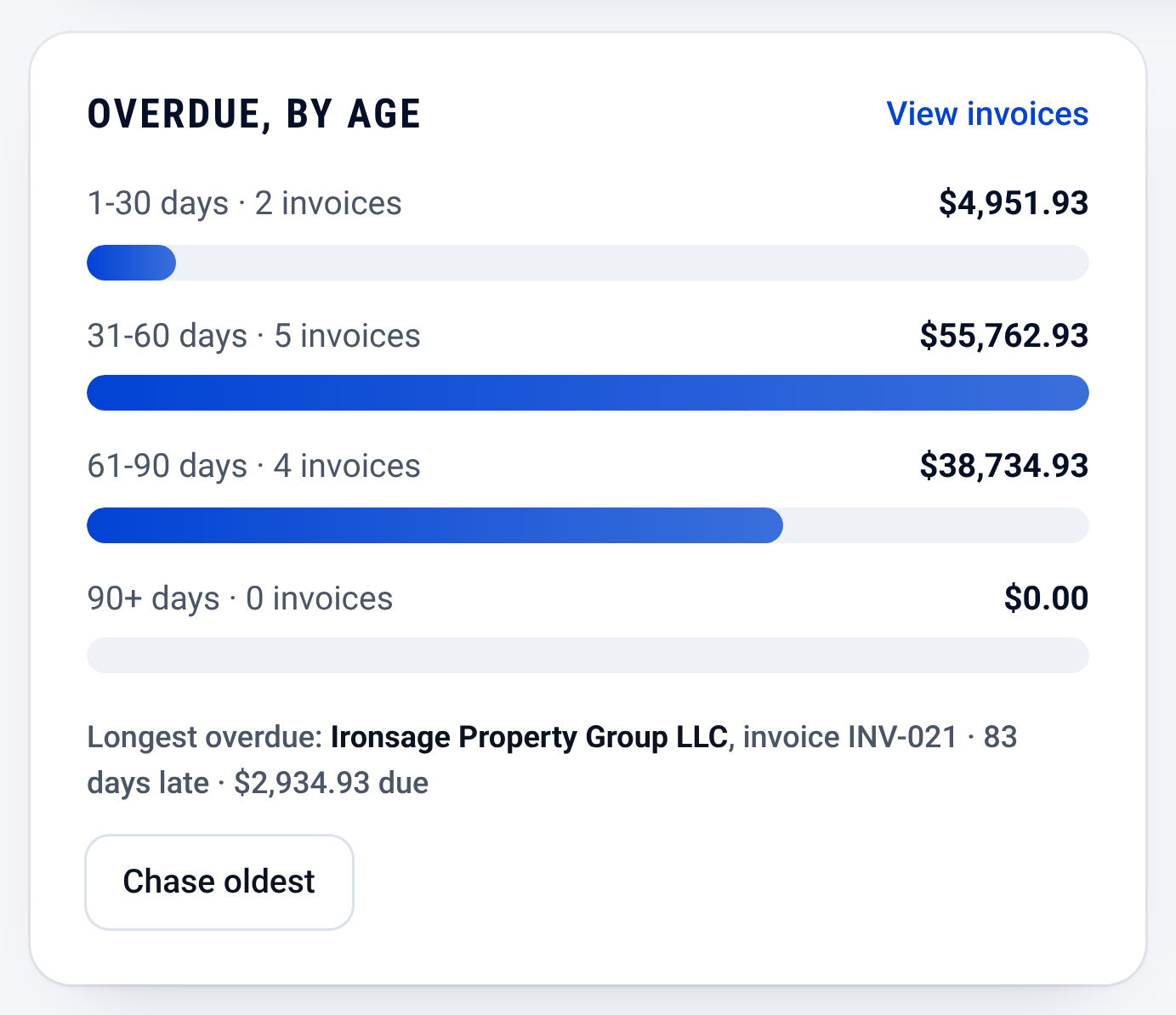
Invoices: who owes you, and how late

Check it yourself
- Every step in this guide works on paper or in a spreadsheet. Nothing here needs CONSTRUKTR.
- Every CONSTRUKTR feature named here is on the features page, with the plan it comes with.
- Watch the real dashboard and phone app work on a demo company.
Questions owners ask
Will reminding customers annoy them?
Keep it short and polite, and send it on the same schedule to everyone, so nobody is singled out.
What if a customer says they already paid?
Thank them, and check your bank record before you answer. If the payment is there, mark the invoice paid that day, so the list stays true.
Can software keep this list for me?
Partly. In the CONSTRUKTR app, the AI daily brief on the home screen names how many invoices are overdue and their total, written from your own invoices. You still decide who to call.
See it on your own jobs.
30 days free, no credit card required
Paid plans renew automatically. 100-day money-back guarantee on your first paid charge. Request a refund at support@construktr.ai. Cancel any time; access continues to the end of the paid period.