Free Profit Leak Check: six quick questions, and the hours and dollars your after-hours office work costs you. Plumbing · HVAC · Electrical · Roofing
Works together
One job. The crew on the phone, the office on the web, the same facts on both.
This is the demo company's real data, on the real web dashboard and the real CONSTRUKTR app. Pick a step to see each part of the job on both screens.
The office books the job. The tech already has it.
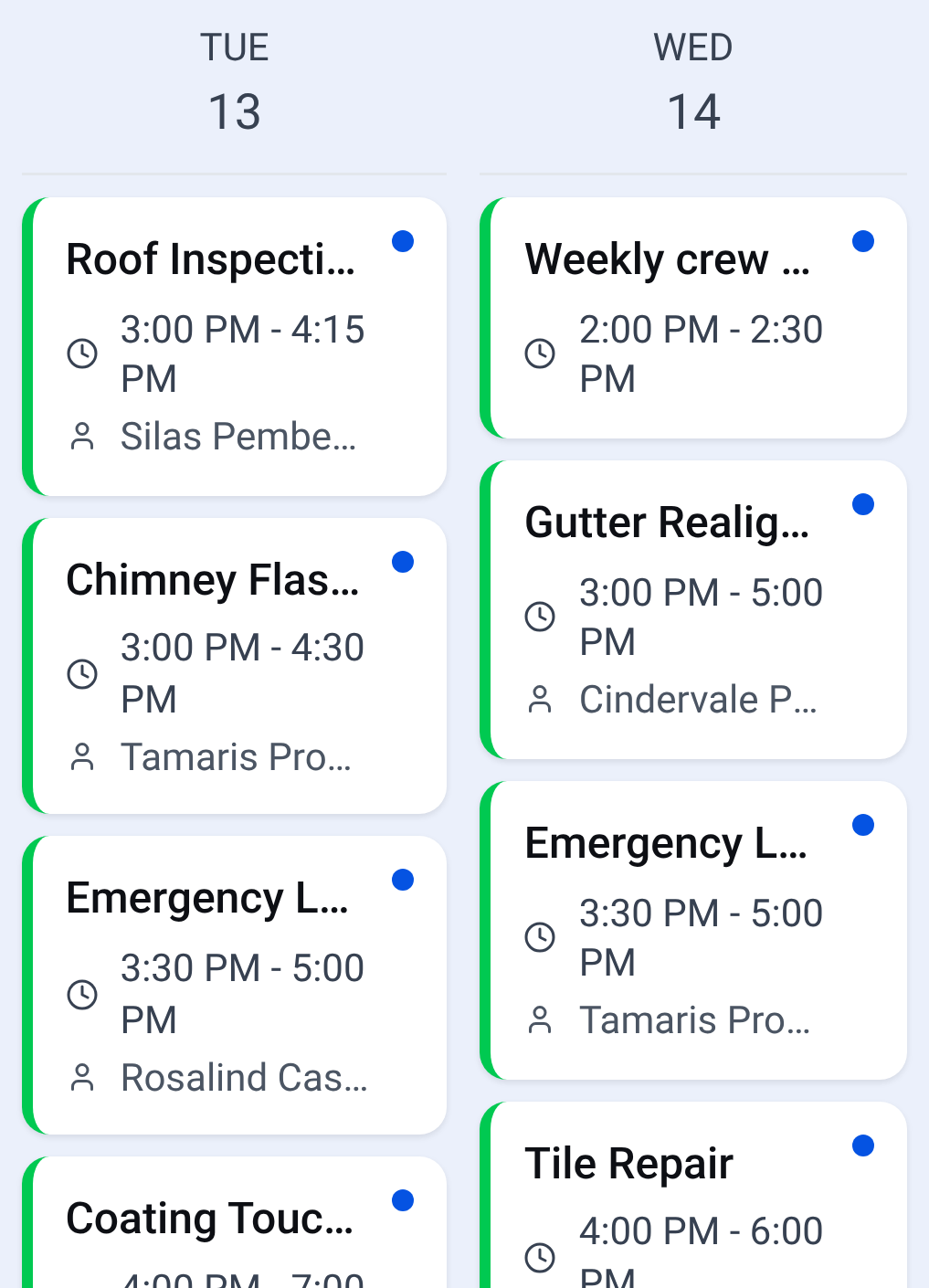
Put the job on the calendar at app.construktr.ai and it is on the tech's schedule in the app. No 6 AM phone call, no group text, no whiteboard photo.
1The office's week on the web calendar, every job with its time, and most with the customer.
2Where a job booked on the web calendar shows up for the tech.
app.construktr.ai/calendar
1
1
2
The tech clocks in on site. The office sees it on the job.
One tap starts the clock, and the location is recorded at clock-in and clock-out when the worker allows it. The hours land on the job record, where the office sees them.
1Clock in from the phone, at the job site.
2The job's time, photos and notes tabs on the office screen.
3Where the job stands. In the demo company: Awaiting Parts.
app.construktr.ai/jobs
23
1
Know what needs you today, from the truck or the desk.
The AI briefing reads your own jobs, estimates and invoices and tells you what to deal with first, on the phone and on the dashboard. You decide what to do about it.
1The AI daily brief on the phone's home screen.
2A briefing like it on the web dashboard, captured on a different day.
3What needs you today, each with a button that opens the work.
app.construktr.ai
23
23
1
See who owes you, and chase it from one screen.
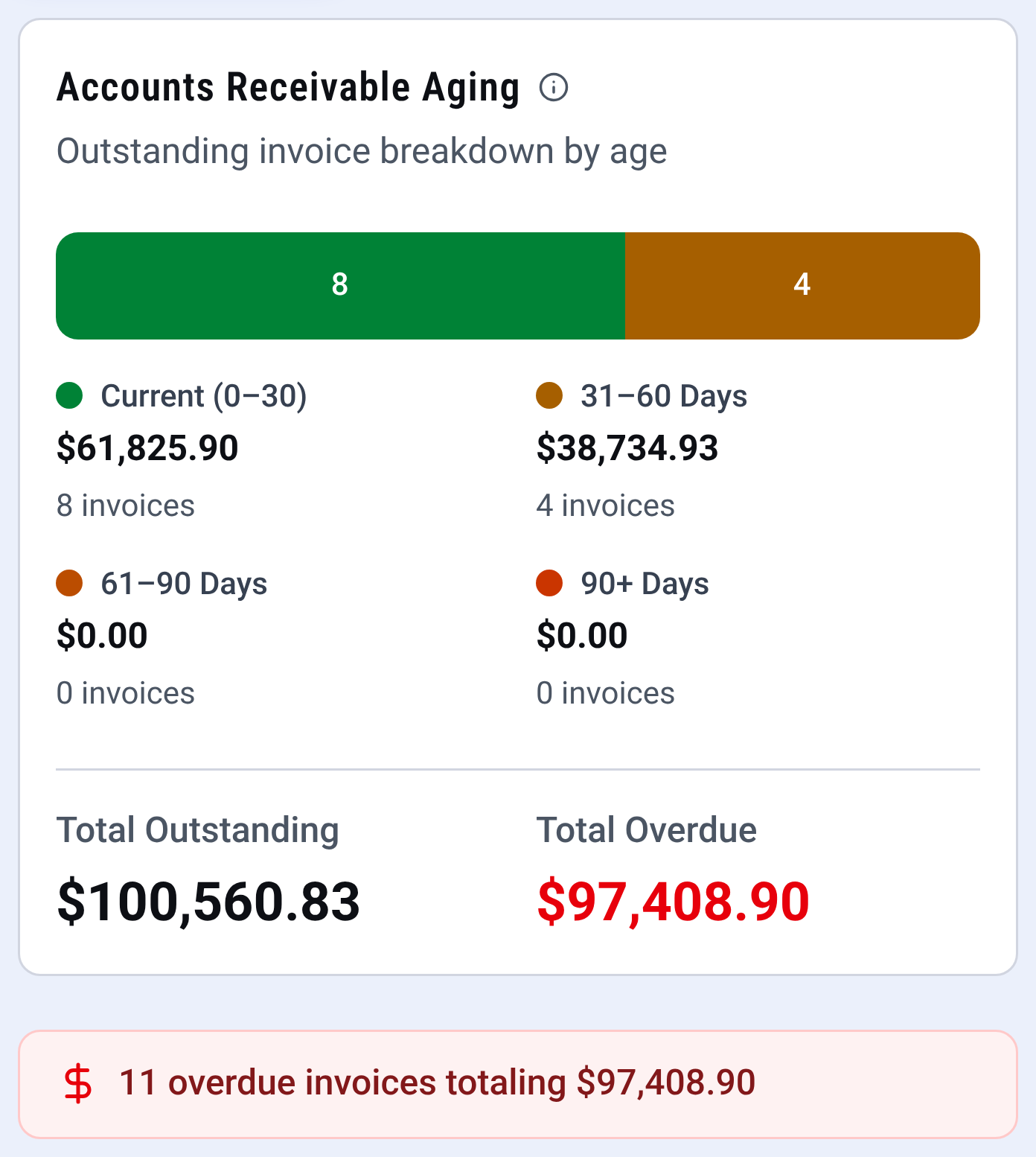
Finished work becomes an invoice with a pay link once your Stripe account is connected. The invoices page shows what is current, late and overdue, so nothing slips through.
1Every open invoice sorted by how late it is.
2What is overdue, in red. In the demo company: $97,408.90 on 11 invoices.
3The AI daily brief on the owner's phone calls overdue invoices the big item. In the demo company: 11 invoices, $97,408.90.
app.construktr.ai/invoices
12
12
3
If your crew can use a phone app, they can use this. Each tech sees their own jobs and what is next.
The web dashboard is on Pro and Business and in every free trial. The CONSTRUKTR app is on every plan.
One price for the shop, not per person. Pick how many people you have.
8 people: CONSTRUKTR Pro, 15 users, $199 a month.
What a shop of 8 people pays
Company
Plan
Price a month
CONSTRUKTR
Pro, 15 users
$199, or $166 billed yearly
Jobber
Connect, 10 users
$299, or $229 billed yearlyplus $29 a month per added user
Founding members lock their rate for life and help shape the product for every business that follows. It is annual only and paid up front. Founding rate on Pro and Business. Founding places are open to the first 100 founding members.
Pro
$1,390/yr
Founding annual rate, locked for life. Regular annual $1,990/yr.
Business
$2,440/yr
Founding annual rate, locked for life. Regular annual $3,490/yr.
The founding rate is offered on your billing page when your trial ends. Paid annually, up front, and locked for life.
Questions, answered plainly
What is CONSTRUKTR?
CONSTRUKTR is AI field service software for HVAC, plumbing, electrical and other service trade businesses with 1 to 15 techs. The office runs on a web dashboard and the crew runs on the CONSTRUKTR app for iPhone and Android, both working the same jobs. The iPhone and Android apps are launching on the App Store and Google Play, and the web dashboard works today. Plans are $199 (15 users) and $349 (unlimited users) a month, one price for the business up to each plan's user limit with no per-user fees, and every plan starts with a 30-day free trial with no credit card required. Starter and Core go on sale when the CONSTRUKTR app is in the App Store and Google Play. Until then, a trial continues on Pro or Business.
Is there a free trial?
Yes. Every new account starts with a 30-day free trial with full Pro access, including the web dashboard, and no credit card is required. There is no permanent free plan: when the trial ends you choose a paid plan, and you can cancel anytime. Starter and Core go on sale when the CONSTRUKTR app is in the App Store and Google Play. Until then, a trial continues on Pro or Business.
Which plan do I need?
If you run an office or a dispatcher, choose Pro or Business: they include the web dashboard and its drag-and-drop dispatch board, plus the app for the crew. Starter and Core are for a solo operator or a small crew working from their phones. Runs on the CONSTRUKTR app for iPhone and Android. The web dashboard is on Pro and Business, and every free trial includes it. Starter and Core go on sale when the CONSTRUKTR app is in the App Store and Google Play. Until then, a trial continues on Pro or Business.
How do payments work?
Customers pay by credit or debit card through Stripe, once your company has connected its own Stripe account. Until then, card payments are switched off and the customer pays you another way. Today a card is taken on site from the account owner's phone in the app; office staff can record cash, check or bank transfer, and you can send an invoice link for the customer to pay online. CONSTRUKTR never sees or stores full card numbers. When the money reaches your bank depends on your Stripe payout schedule.
Can I bring my data from my current system?
Yes. A CSV import wizard brings over clients, jobs, and price books from a spreadsheet export, so you start with the records you already have. How long setup takes depends mostly on how much you bring.
What happens if I cancel?
You can cancel anytime, with no contracts and no cancellation fees. Every plan renews automatically until you cancel, and your plan keeps working to the end of the period you already paid for. There are no refunds on any plan, monthly, annual, or founding. Your account and data stay in place after cancellation, so you can come back or ask support@construktr.ai for a copy of your data. Deleting your account entirely is separate and is covered on our account deletion page.
Close the laptop. The job, the invoice and the schedule are already where they belong.
Start the free trial today with the web dashboard included. No per-user fees, cancel anytime.