


The customer said go ahead, out loud. Who remembers at invoice time?
For example: Your tech finds more work behind the wall, and the customer says go ahead, out loud.
30 days free, no credit card required

Generated image, not a real person.
What it costs
At invoice time, nobody remembers who agreed to what.
What owners do today
A phone call to the office and a note that never makes it to the invoice.
Stop before the extra work starts
A spoken yes is real in the moment and gone by the time the invoice arrives. Make it a rule for the whole crew: when the work grows past the estimate, stop and write it down before the tools come out.
Write down five things
Each change, however small, gets the same short record:
- What was found, in plain words, with a photo when you can.
- Why it needs doing, and what happens if it is left.
- What it adds to the price, and to the time on site.
- Who said yes, and when.
- Who on your side approved the price.
Get the customer's yes in writing
Send the change to the customer and ask them to reply yes in writing: an email reply or a signature on the page both work. Keep that reply with the job. It ends the argument before it starts.
Put it on the invoice as its own line
List each change separately on the invoice, in the same words you used when the customer agreed. The customer recognizes their own yes, and the original price stays the price they were quoted.
Work that comes off the job gets the same treatment, so the customer sees the credit too.
Say it before the job starts
One line on every estimate sets the rule for both sides: anything found once the work is open is priced and agreed before it is done. Nobody is surprised, because nobody was told otherwise.
More guides: Price a job so it covers parts, labor and overhead; A weekly routine for who still owes you; Ask customers for reviews, and remember to; Switch software without losing your customer list; The first month on new software, week by week; Price good, better and best options; HVAC estimates and invoices; Plumbing estimates and invoices; Electrical estimates and invoices; Roofing estimates and invoices; Solar estimates and invoices; Handyman estimates and invoices. All guides.
Change orders Every plan
The tech raises the added work from the job.
The office prices and approves it, with a record of who approved what.
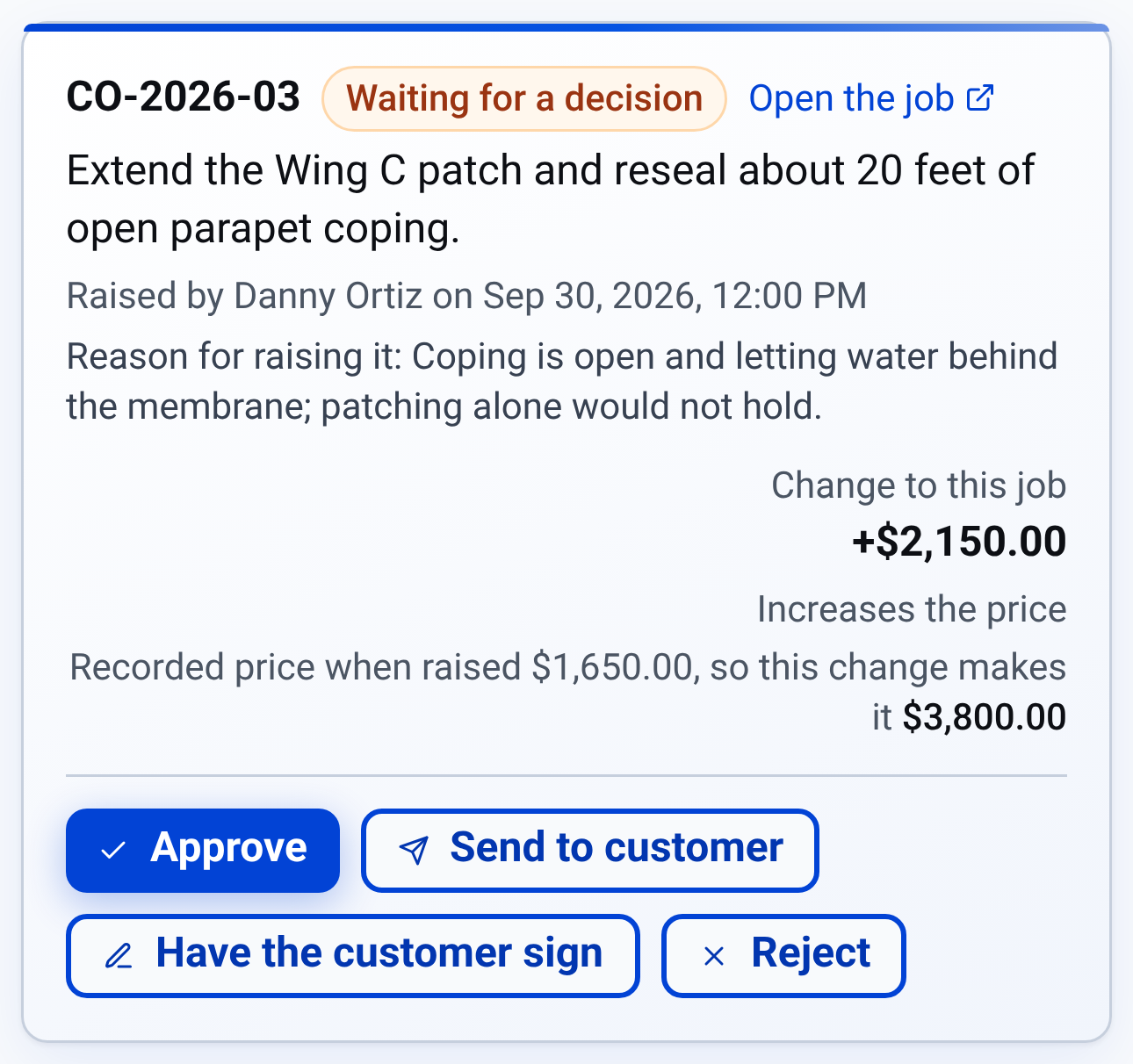
Change orders: who raised the extra work, why, and what it adds

Check it yourself
- Every step in this guide works on paper or in a spreadsheet. Nothing here needs CONSTRUKTR.
- Every CONSTRUKTR feature named here is on the features page, with the plan it comes with.
- Watch the real dashboard and phone app work on a demo company.
Questions owners ask
Will asking for a signature slow the job down?
Very little. A one-line written yes is a record, and it is quicker than an argument at invoice time.
What if the customer will not agree in writing?
Make anything unsafe safe first, such as an active leak or a live wire. Then stop, finish what was quoted, and price the rest as its own job.
Can software keep this record?
Yes, on your side. CONSTRUKTR's change orders come with every plan: a tech raises the added scope from the job, the office prices it and approves it, and the record keeps who approved what. The customer's own yes is still yours to get, by email or on paper.
See it on your own jobs.
30 days free, no credit card required
Paid plans renew automatically. 100-day money-back guarantee on your first paid charge. Request a refund at support@construktr.ai. Cancel any time; access continues to the end of the paid period.