

Monday morning, and not sure which customers still owe you?
For example: Monday morning, and you are not sure which customers still owe you.
30 days free, no credit card required

What it costs
Money you earned, sitting with people you forgot to ask.
What owners do today
Go through the invoice folder and the bank statement side by side.
What is in the kit
- A blank estimate form.
- A blank invoice form.
- A weekly list of who still owes you, with the routine that goes with it.
- A guide to pricing a job so it covers parts, labor and overhead.
The two forms hold only field labels and ruled blank cells. This page lists no prices, because what a job costs depends on your suppliers, your market and your own hours.
A weekly routine for who still owes you
Pick one time each week, and keep it
Chasing payment works best as a habit, not a mood. Pick one time each week, such as Monday morning before the first call, and put it on the calendar like a job.
Make one list, oldest first
Write down every invoice you sent that is not paid yet. For each one, note:
- The customer and the job.
- The amount.
- The date you sent it, and the date it was due.
- The last time anyone reminded them, and how.
Sort the list into three piles
Each pile gets a different, polite next step, done the same day.
- Not due yet: nothing to do. Check it again next week.
- Just past due: a short, friendly reminder by email, with the invoice attached.
- Long past due: a phone call. Ask when they plan to pay, and write down what they said.
Record every payment the day it comes in
A check that rides in the truck for a week still shows as unpaid, and the next Monday you chase someone who already paid. Mark each invoice paid the day the money arrives, so the list stays true.
Make the next invoice easier to pay
The easiest invoice to pay is one the customer expected. Put your payment terms on the estimate, send the invoice when the work is done, and say in one line how the customer can pay.
Price a job so it covers parts, labor and overhead
Find the floor before you write the number
Every job has a floor: the price where you do the work and end up with nothing. Work it out before you decide what to charge, not after the customer says yes.
The floor is three things added together. Write each one down for this job, even as a rough figure.
- Parts: what you paid for them, plus what it took to get them (the supply house run, delivery, the parts you return).
- Labor: the hours on site and the hours driving, times what an hour of that tech costs you, not just their wage. Payroll taxes, insurance and the truck are part of that hour.
- Overhead: this job's share of what you pay to stay open, such as rent, insurance, phones, software and your own office time. Spread it over the hours you actually bill in a year, not the hours you are open.
Add profit on purpose
Profit is a line you decide, not whatever is left over. Pick the amount you want this job to earn above the floor, and add it as its own step.
If you skip this step, every surprise on site comes out of your pocket: the stuck fitting, the second trip, the extra hour.
Compare the number you want to send with the floor
Now look at the price you were about to send. If it sits close to the floor, you have three honest choices, and each is better than finding out later.
- Raise the price, and say what the customer gets for it.
- Change the scope: a smaller option at a price that works, next to the full job.
- Walk away, knowing exactly why. A job below the floor costs you money to win.
Write the floor down where you quote
The floor is easy to forget in a customer's driveway. Keep your prices in one place, with your costs next to them, so the next quote starts from numbers you already checked instead of a guess.
Take it with you
Get the Trades Back Office Kit as a PDF
Leave your first name and business email and the PDF downloads at once.
AI daily brief
Open the app's home screen in the morning.
The AI daily brief names how many invoices are overdue and their total, from your own invoices.
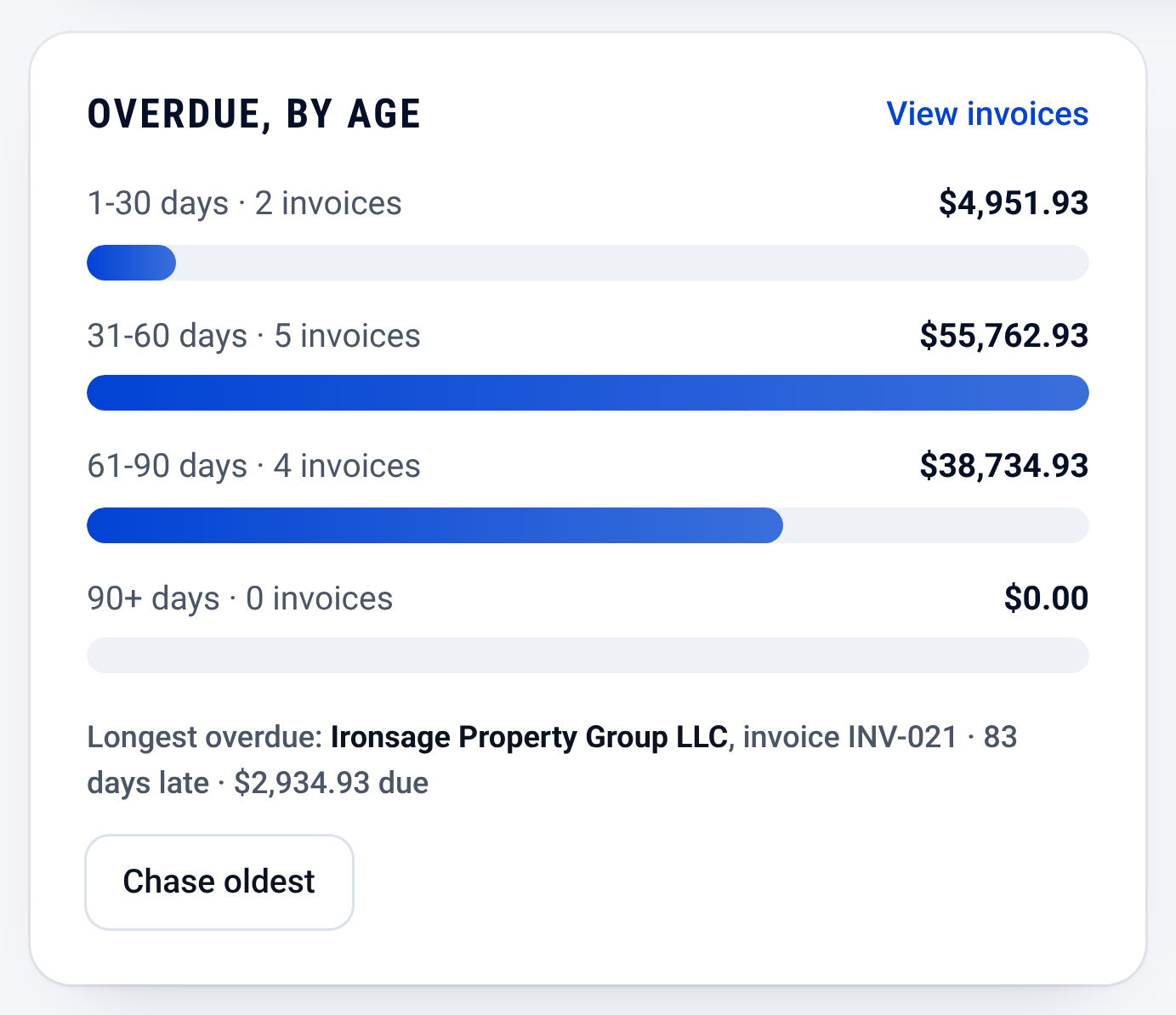
Invoices: who owes you, and how late

Check it yourself
- Read the routine and the guide on this page: the PDF holds the same words, plus two blank forms.
- Every step works on paper or in a spreadsheet. Nothing here needs CONSTRUKTR.
- Watch the real dashboard and phone app work on a demo company.
Questions owners ask
Do I have to sign up to get this?
No. Every part of the kit is on this page as text. The PDF downloads after you leave a first name and a business email.
Will reminding customers annoy them?
Keep it short and polite, and send it on the same schedule to everyone, so nobody is singled out.
What if a customer says they already paid?
Thank them, and check your bank record before you answer. If the payment is there, mark the invoice paid that day, so the list stays true.
See it on your own jobs.
30 days free, no credit card required
Paid plans renew automatically. 100-day money-back guarantee on your first paid charge. Request a refund at support@construktr.ai. Cancel any time; access continues to the end of the paid period.