


Your bookkeeper is retyping last week's invoices. Again.
For example: Your bookkeeper is chasing last week's invoices so they can type them in again.
30 days free, no credit card required

Generated image, not a real person.
What it costs
The same invoice typed twice, by two people.
What owners do today
Export, email, retype.
Pro $199 a month, Business $349 a month. No per-user fees, and yearly pays 10 months. Starter and Core are not on sale yet. Until then, a trial continues on Pro or Business. See all plans and prices
What syncs, and what you do
You connect your own QuickBooks Online account to your CONSTRUKTR company. After that, the customers, invoices and payments you record in CONSTRUKTR sync to QuickBooks Online. Nothing syncs until you connect it, and you can disconnect it whenever you want. Your CONSTRUKTR data stays where it is.
The invoices screen further down this page is the top of the CONSTRUKTR invoices page for the demo company: the card that shows what is owed and how late. It is the invoicing side of CONSTRUKTR, where the invoices you create live. The screen does not show the QuickBooks connection or the sync.
- Customers: the customers in CONSTRUKTR.
- Invoices: the invoices you create from a job.
- Payments: the payments recorded against those invoices.
Where it stops
It works with QuickBooks Online only. QuickBooks Desktop is not supported.
The payments that sync are the ones recorded on your CONSTRUKTR invoices. Your bookkeeper still reviews the books in QuickBooks Online the way they do today.
Three questions to ask your bookkeeper first
These work whatever software you use, and they tell you whether retyping is costing you a weekly job.
- Which invoices did you type in by hand this month?
- Do the customer names in the books match the names on the jobs?
- Which payments did you have to chase me for because the books did not show them?
QuickBooks Online sync Core and up
Connect QuickBooks Online.
Customers, invoices and payments sync to it.
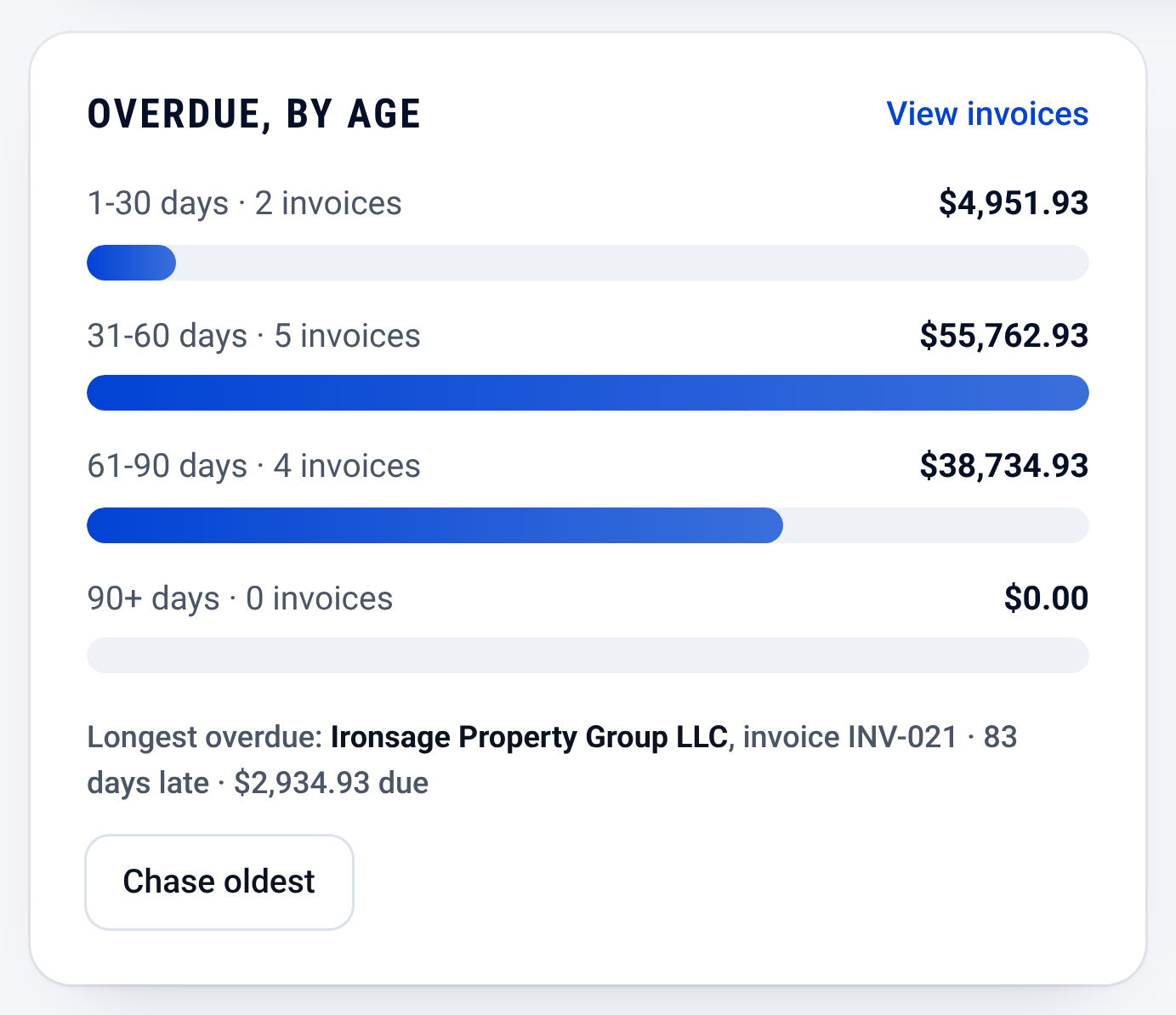
Invoices: who owes you, and how late

Check it yourself
- The screen above is the real CONSTRUKTR invoices page, captured from the demo company. It does not show the QuickBooks connection, and its figures are the demo company's, not a result.
- The web dashboard shown above comes with Pro and Business and every 30-day free trial. The QuickBooks Online sync itself comes with Core and up. See the plans.
- The QuickBooks Online sync is listed with its plan on the features page.
- Disconnecting is documented on its own page.
Questions owners ask
Which plan has the QuickBooks Online sync?
QuickBooks Online sync comes with Core and up. The plans and their prices are on the pricing page.
Does it work with QuickBooks Desktop?
No. It works with QuickBooks Online only.
What happens to my data if I disconnect?
Your CONSTRUKTR data stays intact. You can disconnect CONSTRUKTR from QuickBooks Online at any time, and the page at /disconnect walks through it.
Does it connect without my say-so?
No. It connects only to your own QuickBooks Online account, and only after you connect it.
See it on your own jobs.
30 days free, no credit card required
Paid plans renew automatically. 100-day money-back guarantee on your first paid charge. Request a refund at support@construktr.ai. Cancel any time; access continues to the end of the paid period.